Patient data never leaves your organization

Run quality measures against your own data — without a vendor stack.

Lenny is a free, open-source orchestration layer between your FHIR data and a standards-compliant measure engine. Point it at your data, run the measure, and get population counts and per-patient results your team can read — no vendor required.

  • $300–$4,000 per provider / yr — what ACOs pay vendors today
  • Pre-loaded with quality measures
  • No license. No vendor.
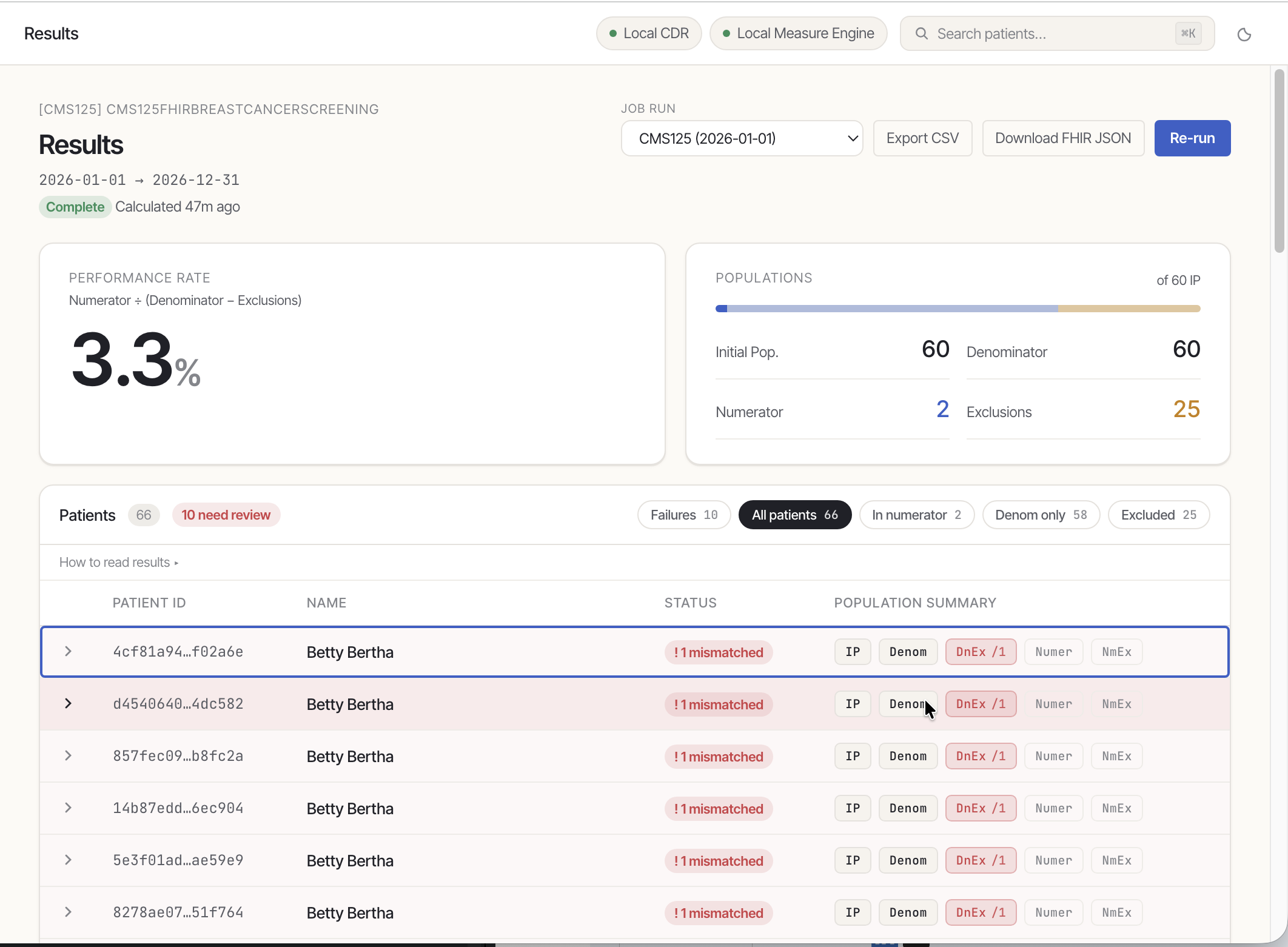
Lenny results screen showing a 3.3% performance rate with population breakdown and patient table
3.3%
Performance rate
CMS125 · Breast Cancer Screening · 60 IP

Open source · DEQM-aligned

The workflow layer between your data and your measures.

Lenny is a free utility for calculating FHIR-based digital quality measures. Upload a Measure bundle, pick a period, click Calculate — and get population counts plus per-patient drill-down with the resources that drove every result.

Lenny results UI

Vendor-neutral · FHIR-native

One orchestrator between your CDR and any FHIR measure engine.

Lenny sits in the middle of the DEQM workflow — pulling patients from your clinical data repository, handing them to a measure calculation service, and turning the report into something you can actually inspect.

Free Apache-licensed, on GitHub
CMS-aligned Follows federal quality measure standards
No setup complexity Installs in under a minute

Why Lenny

Built for organizations ready to own their quality data.

If you’re an ACO or health system paying per-provider fees for measure calculation, Lenny turns a pure cost center into capability you own — compute, validate, and inspect digital quality measures against your own FHIR data, no vendor stack required.

ACOs & hospital quality departments

Quality leaders with a vendor bill

Stop paying $300–$4,000 per provider, per year for calculation you can run in-house. Compute eCQMs against your own FHIR data and see the population counts — and the patients — behind every result.

Provider organizations

Quality & informatics analysts

Run calculations without waiting on a vendor ticket queue. Plain-language, per-patient output you can interpret without an engineer in the room.

QIOs & health IT consultancies

Teams deploying across networks

A free, FHIR-native engine you control and can stand up across provider networks — a vendor-neutral foundation to build your own delivery workflows on.
What you can do

Five things Lenny does on day one.

01

Run any FHIR Measure

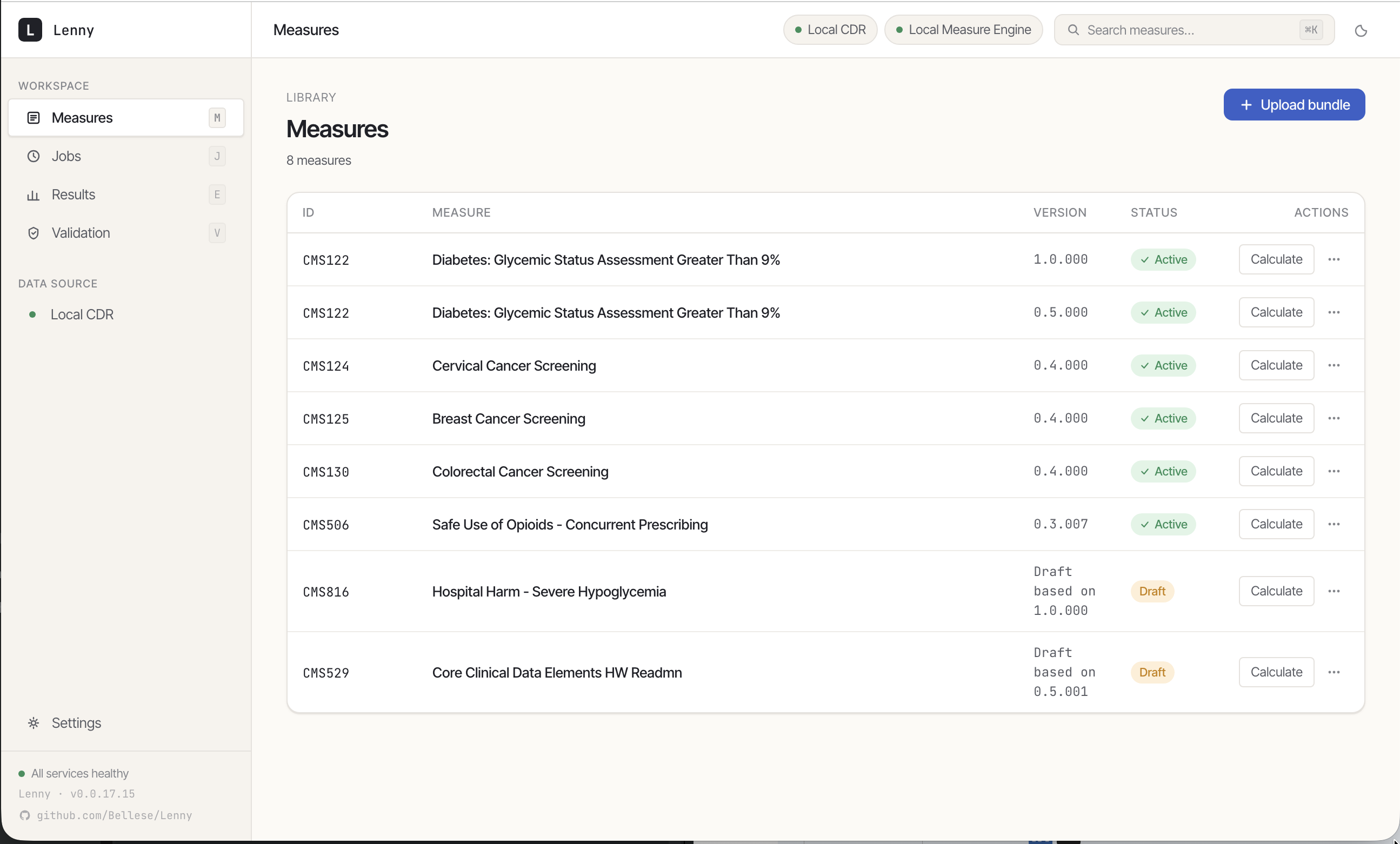
Upload a Measure bundle, pick a measurement period, optionally filter by FHIR Group, click Calculate. Lenny pulls patients from your CDR, evaluates the measure on a HAPI-based engine, and stores the results.

  • Pre-loaded eCQMs
  • Bundle upload for your own measures
  • Period & Group filtering at calculation time
Lenny measures library showing eight measures with status and per-row Calculate actions
02

Inspect at every level

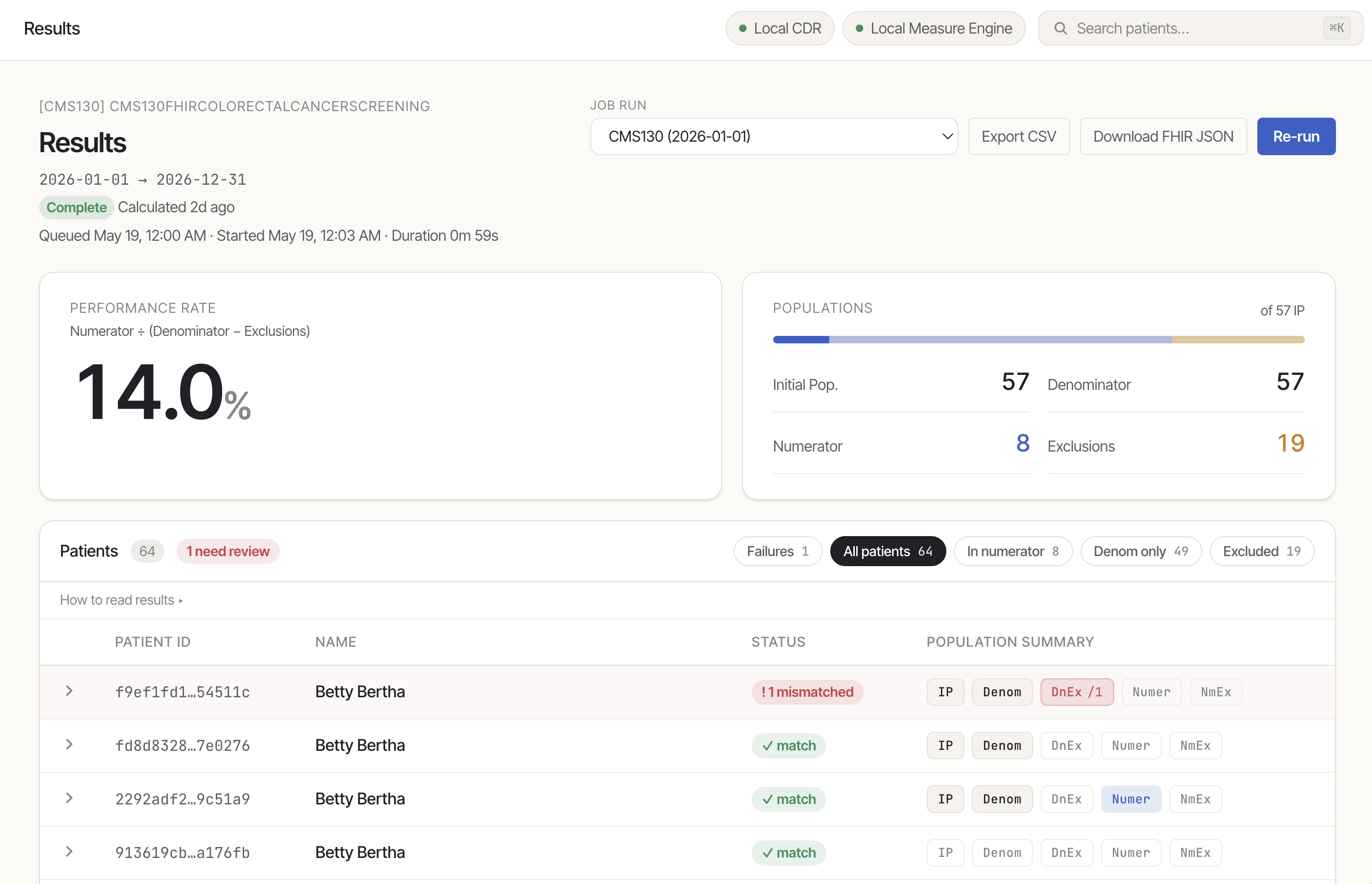
Aggregate population counts — initial population, denominator, numerator, exclusions, and the derived performance rate — with per-patient drill-down that shows the resources that drove each result.

  • Performance rate and population summary
  • Patient table filterable by failure, numerator, denom-only, excluded
  • Per-patient evaluated resources with raw FHIR available
Lenny results screen with performance rate, population counts, and a patient table that includes a mismatched row
03

Validate against expected results

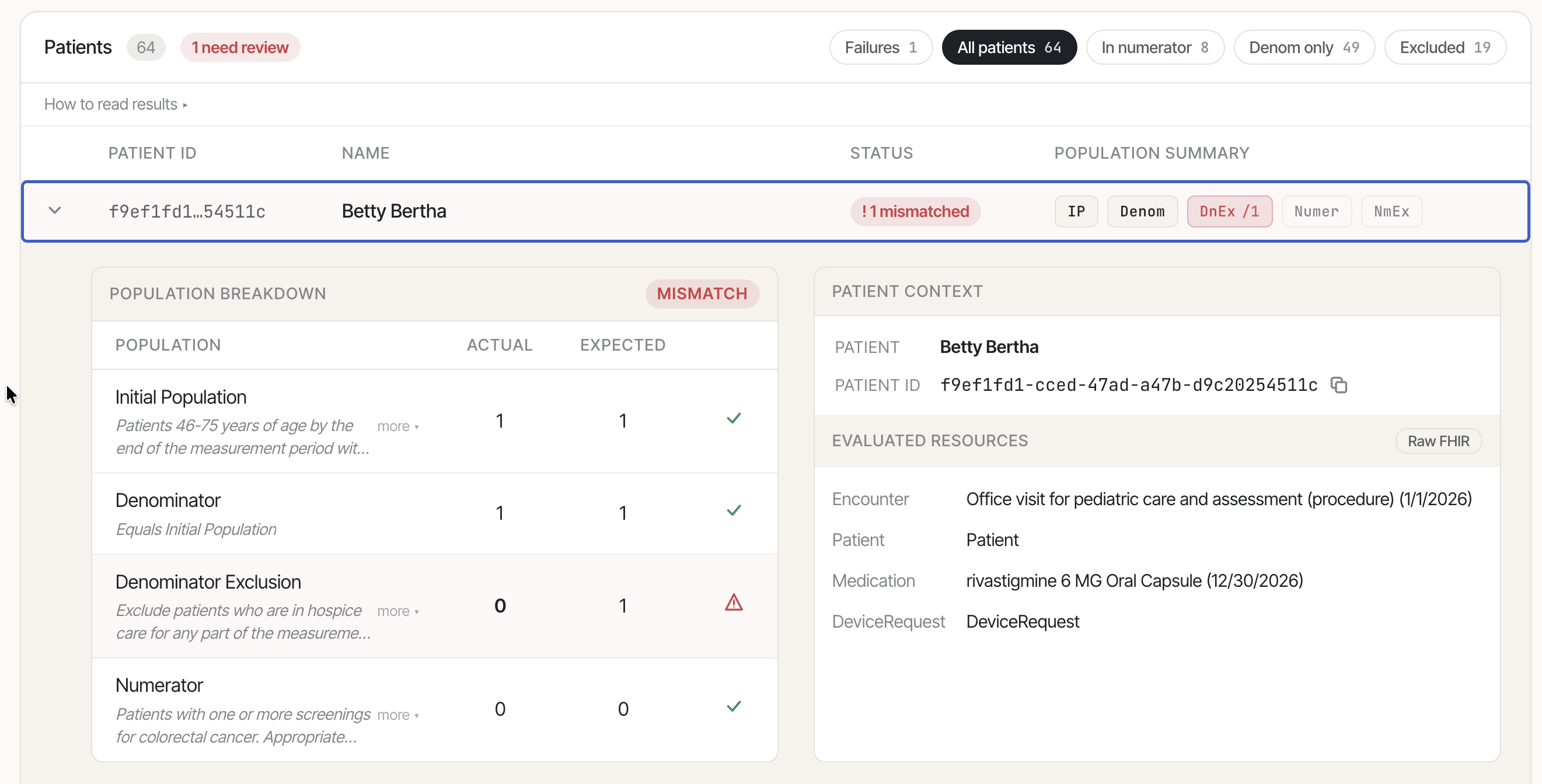
Upload a test bundle that declares expected population membership; Lenny re-runs the measure per patient and reports pass/fail. Built for data validation and certification workflows. (Opt-in via Settings.)

  • Per-patient actual vs. expected, side-by-side
  • Mismatch surfacing on the result row and population row
  • Test bundles in, pass/fail out — no spreadsheets
Patient drill-down for Betty Bertha showing a population breakdown with a mismatch on Denominator Exclusion, alongside patient context and evaluated FHIR resources
04

Secure connections to your systems

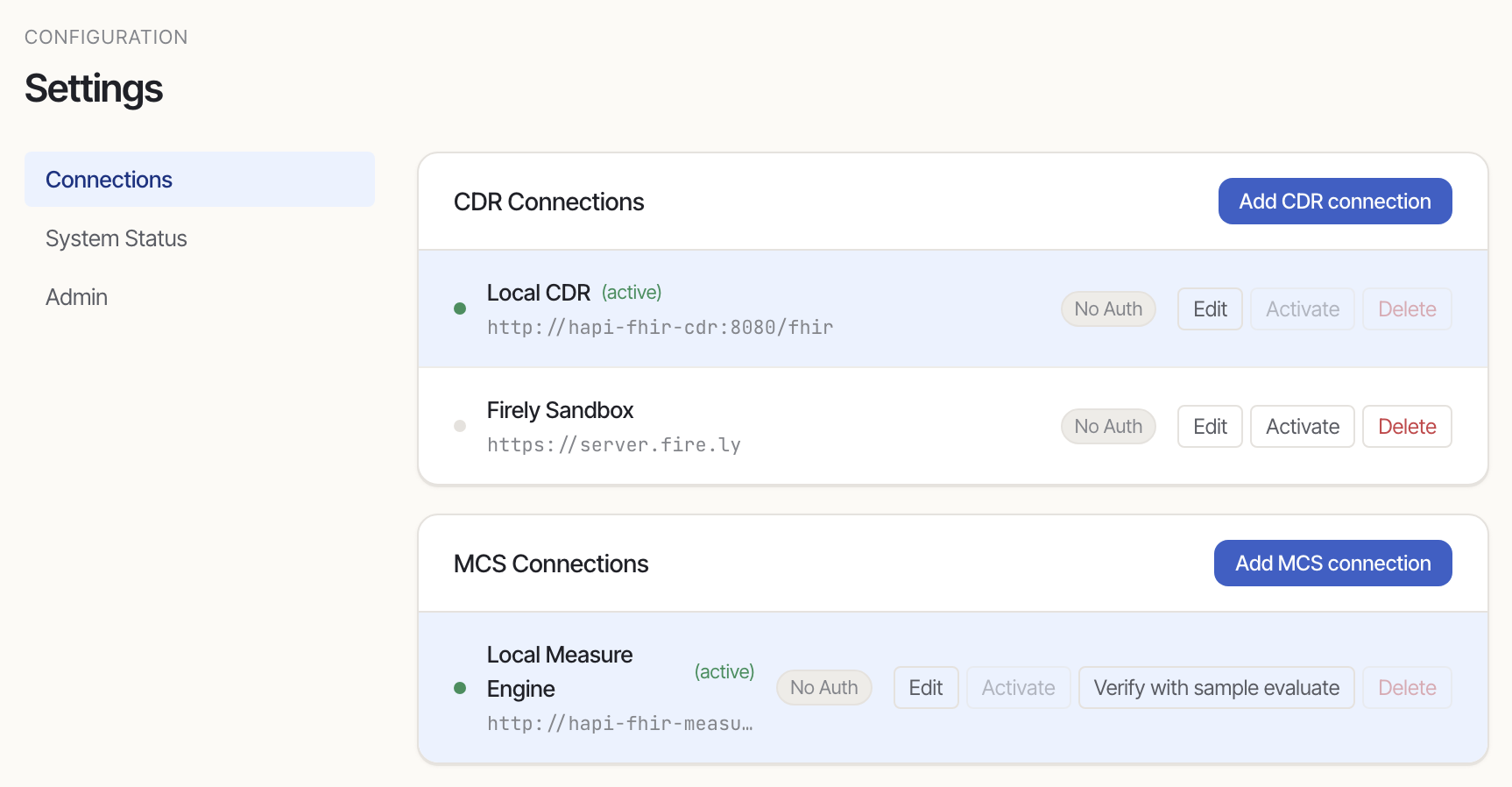
Configure several clinical data repositories (CDRs) and measure calculation services (MCSs); switch the active one with one click. Verify connectivity per server, including a Verify with sample evaluate probe that exercises engine measure resolution.

  • Connect to multiple FHIR servers, switch between them with one click. Credentials encrypted at rest.
  • SSRF protection on every outbound URL
  • Read-only flag for shared / production CDRs
Settings panel with CDR and MCS connections, active flags, and verify actions
05

Up and running in under a minute

Quality measures and sample patients ship pre-loaded, so your team can run a complete calculation on day one.

  • No data wrangling on day one
  • Reference CDR + measure engine included for local testing
  • Swap in your own FHIR servers from Settings at any time
$ cp .env.example .env
$ docker compose up
[+] Running 5/5
  Container lenny-postgres        Started
  Container lenny-hapi-cdr         Started
  Container lenny-hapi-measure     Started
  Container lenny-api               Started
  Container lenny-web               Started
 Open http://localhost:3001

Where Lenny fits

An orchestrator between your data and a measure engine.

Lenny sits amongst the various FHIR servers involved in the dQM workflow specified in the DEQM IG. The CDR and MCS are intentionally separate and both are user-replaceable.

DEQM-ALIGNED ORCHESTRATION CLINICAL DATA REPOSITORY Your CDR FHIR R4 server Patient · Encounter Procedure · Observation $everything · /Patient ORCHESTRATION LAYER Lenny Acquire DataRequirements · Batch Evaluate $evaluate-measure Validate Actual vs. expected Inspect Drill-down UI MEASURE CALCULATION SVC MCS HAPI — or your engine $data-requirements $evaluate-measure MeasureReport resources requirements Measure + data MeasureReport Quality-improvement staff Population counts · per-patient drill-down · CSV / FHIR export

Five Docker services

Web · API · Postgres · HAPI CDR · HAPI Measure Engine. The CDR and MCS are intentionally separate and user-replaceable.

Security posture

Fernet-encrypted credential storage, bearer-token API auth, SSRF protection on every outbound URL, per-connection request timeouts, read-only flag for shared CDRs.

Operating footprint

5 containers · 8–16 GB RAM · 4 cores · 20 GB disk. Stack: React + FastAPI + async SQLAlchemy + PostgreSQL + HAPI FHIR.

Roadmap & known limitations

Active development. Weekly releases. Honest about what’s next.

We’re building in the open. Here’s what’s next.

  1. In progress

    Expanded measure coverage

    Seven of the twelve target connectathon measures ship ready-to-run today. The remaining five are slated for debugging and inclusion in future updates.

  2. In progress

    Intuitive result visualization

    Refinement of the output UI is underway to deliver more digestible summaries and clearer drill-down for both successful and failed calculations.

  3. Planned

    Dynamic MCS synchronization

    Automatically refresh the available measures list when the active Measure Calculation Service changes.

  4. Planned

    Full DEQM role integration

    Native support for Terminology Servers, Measure Repositories, and Receiving Systems (issues #280#282) — moving beyond current localized or pending implementations.

  5. Research

    Optimized data exchange

    Transitioning from expensive $everything fetches to a precision $gather approach based on data requirements. Support for FHIR Bulk Data and invited-pull workflows is under consideration.

Spin up Lenny in under a minute.

Try the live instance, or run it locally with a single docker compose up.